---
title: "Aviary Collections: Your Digital Library's Backbone"
description: Discover how Aviary Collections can transform your digital library into a well-organized, user-friendly, and secure repository for audiovisual content.
image: https://insights.aviaryplatform.com/hubfs/Untitled%20(1200%20x%20628%20px)%20(1).png
---
[](https://www.aviaryplatform.com)
[Discover](https://www.aviaryplatform.com/catalog?search_field=advanced&search_type=simple&title_text=&type_of_search[]=simple) [Pricing](https://www.aviaryplatform.com/pricing) [Features](https://www.aviaryplatform.com/features) [Case Studies](https://www.aviaryplatform.com/case_studies) [Insights](https://insights.aviaryplatform.com/aviary-insights) [About](https://www.aviaryplatform.com/about)
[Discover](https://www.aviaryplatform.com/catalog?search_field=advanced&search_type=simple&title_text=&type_of_search[]=simple) [Pricing](https://www.aviaryplatform.com/pricing) [Features](https://www.aviaryplatform.com/features) [Case Studies](https://www.aviaryplatform.com/case_studies) [Insights](https://insights.aviaryplatform.com/aviary-insights) [About](https://www.aviaryplatform.com/about)
[Skip to content](https://insights.aviaryplatform.com/aviary-insights/aviary-collections-your-digital-librarys-backbone#main-content)
%20(1).png?width=349&height=245&name=Untitled%20(1200%20x%20628%20px)%20(1).png)
Aviary audiovisual AV
# Aviary Collections: Your Digital Library's Backbone

Kevin Glick
January 27, 2026
### Organizing, Presenting, and Controlling Content
Whether you are migrating thousands of hours of content or just starting a pilot project, how you utilize **Collections** in Aviary makes the difference between a messy pile of files and a curated, accessible digital library.
In our recent webinar, *Introduction to Collections in Aviary*, we broke down the strict but simple hierarchy of the Aviary platform and explored the four pillars of effective collection management.
If you missed the live session, here is a recap of how Collections act as the organizational container, user storefront, metadata manager, and security gatekeeper for your audiovisual assets.
---
### The Aviary Hierarchy: What is a Collection?
Before diving into features, it is critical to understand where a Collection lives in the Aviary ecosystem. The hierarchy is strict:
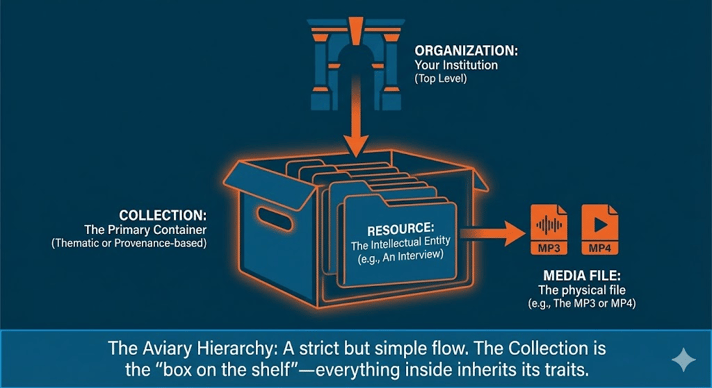
**1. Organization:** Your institution (the top level).
**2. Collection:** The primary container.
**3. Resource:** The intellectual entity (e.g., an interview).
**4. Media File:** The physical file (e.g., MP3, MP4)
**Crucially, a resource cannot float freely; it must live inside a collection.** Furthermore, a resource can only live in **one** single collection at a time. Think of the collection as a container: everything inside it inherits traits from that container.
---
### The 4 Pillars of Aviary Collections
#### Pillar #1. Organizational Structure
From an administrative perspective, Collections are your primary sorting mechanism. When you log into your dashboard, you don't want to see thousands of unrelated files; you want a manageable list of organized groups.
You can structure your collections in several ways:
**Archival Mapping:** Map collections one-to-one with your physical archival collections or finding aids (e.g., "The Kevin Glick Papers").
**Thematic:** Group resources by project or topic, such as an "Oral History Project".
**Format:** Group by media type, such as "Mass Digitization".
**Access Conditions:** Organize items around common restrictions (e.g., "Restricted Collection") to make permission management easier.
#### Pillar #2. User Experience (The Digital Storefront)
A Collection isn't just a backend folder; it is a landing page. You can customize the look and feel to give users context before they even click "play" on a video.
**Visual Identity:** Assign a custom banner image, card image, and even a unique favicon for each collection to distinguish it from the rest of your organization.
**Context:** Display descriptive metadata at the collection level so users understand the provenance and scope of the materials.
**Search Scope:** Collections allow users to limit their search to specific groups of content, helping them navigate large repositories more effectively.
#### Pillar #3. Metadata Management
Metadata work is hard work, but collections help lighten the load. By grouping items, you ensure every resource shares a parent context, meaning you don't need to duplicate information.
Collections also facilitate bulk operations. Instead of sifting through 5,000 organization-wide resources, you can filter by collection to view just the 50 items you need to update. From there, you can perform bulk edits, such as changing statuses, creating transcription jobs, or exporting to CSV for metadata cleanup.
#### Pillar #4. Access Control (The Gatekeeper)
Perhaps the most critical function of a collection is security. Managing permissions on 10,000 individual items is a nightmare; in Aviary, you manage permissions primarily at the collection level.
If a donor asks you to close a specific set of interviews, you can change one setting on the collection, and all items inside are instantly updated.
**Common Access Scenarios:**
**Public:** The collection and all its contents are open to the world.
**Private:** The collection is invisible to the public. Only staff or specific permission groups can see it (e.g., unprocessed collections).
**Public with Restricted Content:** The most common archival scenario. The collection page is visible so users know the content exists, but the media files themselves are locked unless the user requests access.
Aviary provides robust tools to manage these restrictions, including **IP restrictions** (for Virtual Reading Rooms), **"Speed Bumps"** (click-through terms and conditions), and **Automated Request Approvals** for vending-machine-style access.
---
### Beyond Storage: Distribution and Alternatives
**RSS Feeds and Podcasting** Aviary isn't just a destination; it can be a distribution engine. You can generate RSS feeds for any public collection, allowing you to publish podcasts directly to platforms like iTunes or Spotify, or simply alert users when new resources are added.
**Playlists vs. Collections** A common question we hear is, "What if I want a resource in *two* collections?" Since a resource can only live in one collection, the solution is **Playlists**.
Think of a Playlist like a "mixtape" or an exhibition. It allows you to curate items from across different collections without disrupting your archival structure. Note: Playlists are purely for access and curation; they do not change the security permissions of the original file.
---
#### Watch the Full Webinar
Ready to organize your archive? You can watch the full recording of the webinar to see these features in action.
For a deeper dive into the technical details, check out our [User Documentation on Collections](https://coda.aviaryplatform.com/collections-257).
---
#### Next Step:
Would you like me to draft a similar blog post for the upcoming "Introduction to Playlists" webinar mentioned in the transcript to help you prepare for next month's content?
## Share this post
[mailto:https%3A%2F%2Finsights.aviaryplatform.com%2Faviary-insights%2Faviary-collections-your-digital-librarys-backbone](mailto:https%3A%2F%2Finsights.aviaryplatform.com%2Faviary-insights%2Faviary-collections-your-digital-librarys-backbone)
## Keep reading
### [ Aviary AV captions Configuring a foot pedal for Aviary transcript and index editing](https://insights.aviaryplatform.com/aviary-insights/foot-pedal)
### [Aviary audiovisual AV A Winning Partnership for NEH Collections Stewardship Grants: George Blood LP & Aviary](https://insights.aviaryplatform.com/aviary-insights/neh-stewardship-grants)
[See all Aviary Insights](https://insights.aviaryplatform.com/aviary-insights)
```json
{
"@context" : "https://schema.org",
"@type" : "BlogPosting",
"author" : {
"@type" : "Person",
"name" : "Kevin Glick",
"url" : "https://insights.aviaryplatform.com/aviary-insights/author/kevin-glick"
},
"dateModified" : "2026-01-27T14:07:24.645Z",
"datePublished" : "2026-01-27T14:07:24.000Z",
"headline" : "Aviary Collections: Your Digital Library's Backbone",
"image" : [ "https://insights.aviaryplatform.com/hubfs/Untitled%20(1200%20x%20628%20px)%20(1).png" ],
"mainEntityOfPage" : {
"@id" : "https://insights.aviaryplatform.com/aviary-insights/aviary-collections-your-digital-librarys-backbone",
"@type" : "WebPage"
},
"publisher" : {
"@type" : "Organization",
"logo" : {
"@type" : "ImageObject",
"url" : "https://insights.aviaryplatform.com/hubfs/aviary%20by%20avp%20logo%20900%20x%20400.png"
},
"name" : "Aviary Platform - Audio Visual Preservations Solutions Inc"
}
}
```